
How tracking gets set up
When we set up tracking for your campaigns, we follow the ad platform’s own installation instructions and use that platform’s standard implementation.
Who places the code depends on your setup. Some clients give us access and we add it ourselves. Others have a web team or webmaster who handles installation, and we provide the code and the instructions for it. We are not in every client’s site, only the ones that have asked us to be.
Either way, the code is the platform’s standard version, written to run site-wide rather than on selected pages, which is what makes campaign measurement work across every entry point and conversion path.
What that means for consent
We do not write custom firing rules, and we do not build, configure, or run any consent mechanism on your site. If you use a consent tool, that tool is what controls when tags are allowed to fire, and it is selected, installed, and configured by you or your web developer. Whether your site needs one, and how it should behave, are decisions for you and your attorney.
If you need pages excluded
If there are pages, portals, or user flows where tracking should not run, tell your account manager in writing. If we manage the code on your site, we will make the change. If your own team installed it, we will give them exactly what needs to change. Two things worth knowing first:
The list has to come from you. We do not know what is on your pages or what your obligations are, so we cannot tell you which pages to exclude or review your site to work it out. Send us the specific pages or paths and we will act on them, or pass them to whoever manages your site.
Excluding pages affects your reporting. Anything that happens on an excluded page stops being measurable, including conversions. We will walk you through exactly what changes before anything is changed.
If you work in healthcare
This comes up most often for healthcare providers and others who handle health information, where HIPAA and related federal guidance can affect where tracking belongs, particularly on patient portals, intake forms, scheduling, and symptom or condition pages. Whether HIPAA applies to you, and what it requires, is a question for your attorney or your compliance team. We cannot answer it. What we can do is exclude whatever you tell us to exclude, as soon as you tell us.
Who handles what
| Your side | Our side |
|---|---|
| Compliance of your website with privacy, consent, and recording laws | Providing the tracking that makes your marketing services work, and installing it where you have asked us to |
| Your privacy policy, your disclosures, and any consent mechanism on the site | Providing a factual list of the tags and tools we provided, on request |
| Deciding whether to use a consent tool, and which one | Answering technical questions about how that tracking is configured |
| Watching for legal developments that affect your business, with your counsel | Making the changes you or your counsel ask us to make, within your agreement |
| Identifying any pages or user flows where tracking should not run | Making the change where we manage the code, or telling your team exactly what to change |
| Telling us if you want tracking changed, paused, or removed | Doing it when you do |
Put simply: your website is yours. We provide the tracking so your campaigns can be measured, and we install it only where you have asked us to. Decisions about what the site discloses to visitors and what consent it collects are yours to make.
If your attorney wants the details
We will put together a plain list of the tracking tags and tools we have provided for your site. Ask your account manager. Two limits on that list: it covers what we provided, so if your own team handled installation, where and how the code was placed sits with them, and anything you or another vendor added separately will not be on it. It also will not include any opinion from us about whether the setup meets a legal requirement.
About CIPA claims
You may have seen coverage of demand letters and lawsuits brought under California’s Invasion of Privacy Act, usually shortened to CIPA. They concern websites that use ordinary marketing and analytics tools, the same ones used by businesses of nearly every size. Analytics platforms, advertising pixels, call tracking, chat widgets, and session recording tools all come up.
The law in this area moves, and the questions it raises depend on your business, your website, and your circumstances. We are a marketing agency, not a law firm, so we cannot tell you whether any of it applies to you or what you should do about it. That is a conversation worth having with your attorney.
What consent looks like in practice
You have seen all three of these. Here is what they are called and what each one does. Which pattern fits a given website, if any, is a question for that business and its attorney.
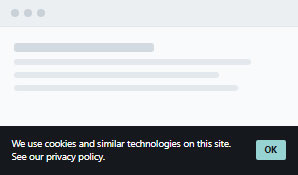
Notice only
Tells visitors that tracking is running and links to a policy. No choice is offered, and tracking runs either way.
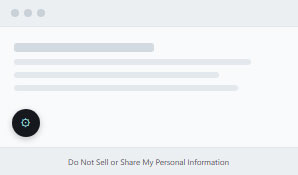
Opt out
No banner interrupts the visit. A control stays on the page, usually with a footer link, so visitors can turn tracking off after the fact.
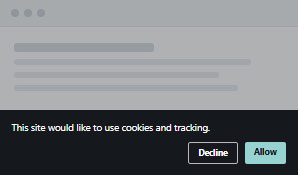
Opt in
A prompt appears first, with accept and decline given equal weight, and tracking is held back until the visitor chooses.
These are illustrations, not recommendations. We are not saying which pattern is right for your site or that any of them satisfies a legal requirement. That is a conversation to have with your attorney.
Consent tools
Some businesses use a consent management platform, which is software that controls how tracking behaves on a website before a visitor makes a choice. Whether you need one, and which one suits your site, are decisions for you to make with your attorney and your web developer. We do not select, evaluate, or implement these tools, so we are not able to steer you toward one.
If you receive a demand letter
Call your attorney. That is the first step and the important one. We are not able to advise you on the letter, what it means, or how to respond.
You are welcome to let your account manager know you received one. If your attorney wants a factual description of the tracking we provided for your site, we will provide it. We will not comment on the letter itself.
About this page
Logical Position, LLC dba LP Agency is a digital marketing agency, not a law firm, and does not provide legal advice. We are sharing this as a courtesy for general awareness only. It may not be complete, current, or applicable to your business.
Nothing on this page is based on a review of your website, your tracking setup, or your legal exposure, and nothing here should be relied on as an assessment of any of those. We do not monitor legal or regulatory developments on your behalf, we are not taking on any duty to advise you about them, and we do not commit to updating this page.
Any company named on this page is named for general awareness only. Naming a company is not an endorsement, a recommendation, or a warranty of any kind, and we are not responsible for any third party’s products or services.
Compliance with privacy, consent, and recording laws for your website is your responsibility. Please talk to your own attorney.
Version 1.1 · Last updated October 29, 2026